Contents
1Requirements & install
- macOS 11 or later; Apple Silicon or Intel.
- Audio Unit v3 (AUv3) effect — Logic Pro, GarageBand, MainStage, AUM, Cubase, Studio One, etc.
- Install: open the Antiphon app once (registers the AUv3), then find Antiphon under the JC Audio manufacturer.
The name “Antiphon” (a call-and-response chant) reflects both a delay's repeats and the responsive form used in worship liturgy.
2Interface overview
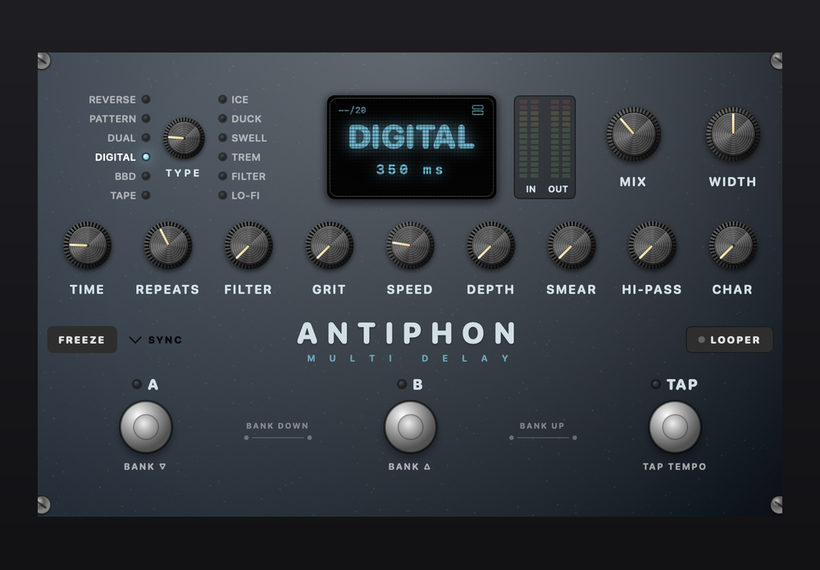
A “pedal” layout — the knob row changes with the selected machine, so the labels always describe what that engine is doing.
- Top toolbar — INPUT / OUTPUT gain, preset nav ◄ [name ▼] ►, SAVE, BYPASS, the eye icon (light/dark).
- Upper row — machine grid (TYPE), OLED display (machine name / delay time; tap to open the Preset Browser), meters, MIX and WIDTH.
- Footswitch strip — FREEZE and SYNC on the left (with a DIVISION note-value button when synced); LOOPER on the right.
- Footswitches — A · BANK ▽ and B · BANK △ step presets; TAP · TEMPO sets the delay time.
3Global parameters
| Knob | Range | What it does |
|---|---|---|
| TIME | 2–2000 ms | Delay time. When SYNC is on, the DIVISION note value sets it instead. |
| REPEATS | 0–10 | Feedback (number of repeats). High values approach self-oscillation. |
| FILTER | bright→dark | Low-pass on the feedback path; higher = darker. |
| GRIT | 0–10 | Saturation / analog character (bit depth on Lo-Fi; Tape/BBD have their own knobs). |
| SPEED | LFO rate | Modulation LFO speed. |
| DEPTH | 0–10 | Modulation depth (becomes RISE time on Swell). |
| SMEAR | 0–10 | Diffusion — a 4-stage allpass network smears the discrete echoes into a smooth, reverb-like wash (on all 12 machines). Higher = hazier. |
| HI-PASS | OFF~~900 Hz | High-pass on the wet signal to clear low-end mud. |
| MIX / WIDTH | 0–100% / 0–200% | Dry/wet, and stereo width (0% mono · 100% normal · 200% wide). |
| INPUT / OUTPUT | −24…+24 dB | Input / output gain. |
4The 12 delay machines
| # | Machine | Character |
|---|---|---|
| 1 | DIGITAL | Clean, precise — versatile. |
| 2 | DUAL | Two delay lines with a ratio (ping-pong / triplets). |
| 3 | PATTERN | Multi-tap rhythmic patterns (8). |
| 4 | REVERSE | Reverse delay. |
| 5 | ICE | Pitch-shifted delay (octave/interval), crystalline. |
| 6 | DUCK | Repeats step back while you play, surface when you stop. |
| 7 | SWELL | Swelling, attackless and dreamy. |
| 8 | TREM | Delay with tremolo modulation (5 shapes). |
| 9 | FILTER | Delay with a resonant filter sweep. |
| 10 | LO-FI | Sample-rate / bit-reduced lo-fi delay. |
| 11 | TAPE | Vintage tape echo (age / bias / crinkle / wow & flutter). |
| 12 | BBD | Analog bucket-brigade delay (dark, degrading). |
5Per-machine knob map
Most machines share the global knobs; these have extra or renamed knobs:
| Machine | Extra / renamed |
|---|---|
| Dual | RATIO — 1/3, 1/2, 2/3, 3/4, 1/1, 4/3, 3/2, 2/1 |
| Pattern | PATTERN — Even · Dotted · Triplet · Ping · Cascade · Synco · Gallop · Sparse |
| Ice | INTERVAL — -OCT, -5th, -4th, -m3, +m3, +4th, +5th, +OCT, +O+5, +2OCT |
| Duck | RELEASE |
| Swell | RISE (replaces Depth) |
| Trem | SHAPE — Sine, Tri, Square, Saw, Ramp |
| Filter | Q |
| Lo-Fi | SAMPLE (rate); GRIT = bit depth |
| Tape | AGE · BIAS · CRINKLE · W&F · TAPE SPD (Normal/Fast) |
| BBD | LOSS · RANGE (Single/Double) |
6Tempo: Sync / Tap / Freeze
- SYNC — click to open a drop-down note-value menu and lock the delay to host tempo: Free · 1/2 · 1/4. · 1/4 · 1/8. · 1/8 · 1/8T · 1/16 (. = dotted, T = triplet). When synced it shows the value and the equivalent ms (at the current host BPM). Choose Free to use the TIME knob instead.
- TAP — tap the footswitch twice or more; the interval sets the delay time.
- FREEZE — feedback to 100% and the input gated, looping the current echoes forever as a bed; press again to release.
7Looper
Click LOOPER (right) to open the panel (up to ~30 s). States: Empty → Rec → Play → Dub → Stopped (dot: red = rec/dub, green = play, gold = stopped).
| Control | Function |
|---|---|
| A (REC / DUB) | Start recording; overdub once a loop exists. |
| B (PLAY) | Play / resume. |
| TAP (STOP) | Stop. |
| REVERSE | Play the loop backwards. |
| HALF | Half-speed (down an octave, double length). |
| UNDO | Undo the last overdub; press again to redo. |
| CLEAR | Erase the loop. |
8Factory presets (20)
Covering all 12 machines.
| # | Name | Machine |
|---|---|---|
| 1 | Slapback | Digital |
| 2 | Quarter Note | Digital |
| 3 | Dotted Eighth | Digital |
| 4 | Ambient Wash | Digital |
| 5 | Cathedral | Digital |
| 6 | Analog Echo | BBD |
| 7 | BBD Dirt | BBD |
| 8 | Tape Echo | Tape |
| 9 | Warped Tape | Tape |
| 10 | Ping-Pong | Dual |
| 11 | Dual Triplet | Dual |
| 12 | Rhythmic Taps | Pattern |
| 13 | Reverse Swell | Reverse |
| 14 | Ice Octave | Ice |
| 15 | Crystal +2Oct | Ice |
| 16 | Ducking Lead | Duck |
| 17 | Volume Swell | Swell |
| 18 | Tremolo Echo | Trem |
| 19 | Filter Sweep | Filter |
| 20 | Lo-Fi Crunch | Lo-Fi |
9Worship tips
- Delay on the beat: turn on SYNC, set DIVISION to 1/4 or dotted 1/8.
- Ambient bed: Digital (Ambient Wash / Cathedral) — long REPEATS, some SMEAR, HI-PASS to clear lows.
- Crystalline: Ice (Ice Octave / Crystal +2Oct), INTERVAL at +OCT or +O+5.
- Lead stays clear: Duck (Ducking Lead) — repeats surface in the gaps.
- Instant pad: play a phrase, hit FREEZE to lock the echoes into an infinite bed.
- Live layering: use the Looper to record a rhythm/pad, PLAY to loop, DUB to stack.
10Troubleshooting
- DAW can't find it: fully launch the Antiphon app once, then rescan.
- Wrong manufacturer / old name: run “killall -9 AudioComponentRegistrar” in Terminal, then rescan. It should read JC Audio / Antiphon.
- TIME knob won't change anything? SYNC may be on — the time is set by DIVISION; turn SYNC off to use TIME.
- Echoes won't stop / keep growing: REPEATS too high, or FREEZE is on — lower REPEATS or release FREEZE.
- Distorting: lower INPUT or MIX.